
Accord's API Platform is currently in Beta.
Table of Contents
- Pre-requisites
- Overview
- Creating an API Key
- Authenticating Requests
- Making Your First Query
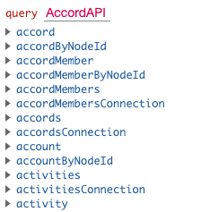
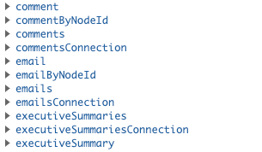
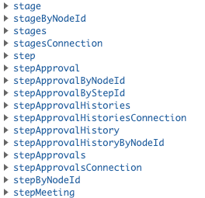
- Available Objects & Endpoints
Pre-requisites
- Only Accord admins can create or manage API keys
- An active Accord license that includes API access (Enterprise tier)
- Basic familiarity with making HTTP requests and reading GraphQL queries
Overview
The API is built on the GraphQL open standard, which means you get a single endpoint, a self-documenting schema, and the ability to fetch exactly the data you need in a single request. As a customer, you have full programmatic access to 20+ objects — Accords, Steps, Contacts, Engagements, Members, Resources, and more.
Check out our developer API documentation at: https://developers.inaccord.com/
Creating an API Key
You can create an API key directly in your Accord workspace:
- Click your Avatar/Profile Picture in the bottom-left corner of Accord
- Click Settings
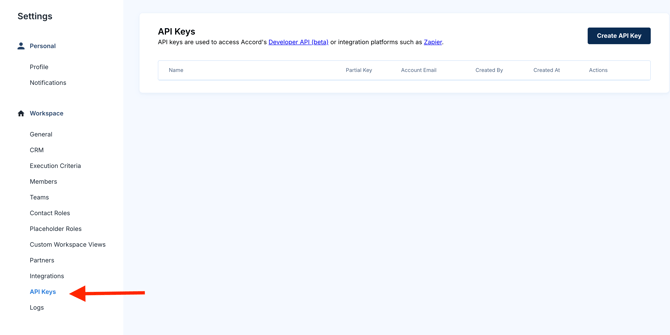
- Navigate to Workspace > API Keys
- Click Create API Key
- Give the key a descriptive name (e.g., “Snowflake sync — production”) so future-you knows what it's for
- Click Create and copy the key immediately — for security, you won't be able to view the full key again after closing the dialog
You can also reach this page directly at <workspace slug>.inaccord.com/api-keys.
Note: Treat API keys like passwords. Anyone with a valid key can read and write data in your workspace, so store them in a secrets manager — never in source control, shared docs, or chat messages.
Pro-tip: Create a separate key per integration (one for your warehouse, one for Zapier, one for your internal script, etc.). If a key gets compromised or you decommission an integration, you can revoke just that key without breaking everything else.
Authenticating Requests
All requests to the Accord API must include your API key in the authorization header as a Bearer token:
authorization: Bearer <YOUR_API_KEY>
The API endpoint is:
https://api2.inaccord.com/graphql
All requests are POST requests with a JSON body containing your GraphQL query.
Making Your First Query
Here's a simple query that fetches the 10 most recently created Accords in your workspace, along with each Accord's account name, opportunity name, amount, and members.
query {
  accords(orderBy: CREATED_AT_DESC) {
    id
    accountName
    opportunityName
    opportunityAmount
    createdAt
    accordMembers {
      id
      account {
        email
      }
    }
  }
}
Check out our article, Accord Developer API Guide, for a deeper dive.
You can run this against the API using curl:
curl -X POST https://api2.inaccord.com/graphql \

  -H "Content-Type: application/json" \

  -H "Authorization: Bearer <YOUR_API_KEY>" \

  -d '{"query": "query { accords { id accountName } }"}'
We recommend using a GraphQL client like Insomnia, Postman, or Apollo Sandbox while you're exploring the schema — they'll give you autocomplete, inline documentation, and a much nicer experience than curl.
 |
 |
 |
A quick note on conventions
- IDs returned by Accord are UUID strings (e.g. "a1b2c3d4-..."). Pass them as plain strings.
- Most “list” queries support a filter argument (rich operators like equalTo, in, isNull) and a simpler condition argument (equality only). Examples below use filter since it composes more cleanly.
- “Soft-deleted” records have deletedAt set to a timestamp. Add deletedAt: { isNull: true } to your filters to exclude them.
Available Objects & Endpoints
The API exposes 20+ object types covering everything you can see in your Accord workspace. The most commonly used objects are:
- Accord: the top-level deal/collaboration record, including account name, opportunity name, amount, stage, and timestamps
- Step: individual action items inside an Accord, including owner, due date, status, and completion
- AccordMember: internal and customer-side participants on an Accord
- Account: the underlying user record for a Member
- Engagement: activity events (views, clicks, completions, comments) tied to an Accord
- Resource: files and links attached to an Accord or the Resource Library
- Playbook: your reusable Accord templates
- Workspace: workspace-level settings and metadata
Ready to get started?
Check out our Developer API Guide for a deeper dive.