
The Resource Library (CMS) is only included with the Enterprise package of Accord.
To learn more about our pricing and packaging options, contact sales@inaccord.com.
What’s In This Article?
- Accessing and Engaging With Content With Accord
- The Resource Library (CMS)
- Playbooks
- Accords
- Syncing Content
Accessing and Engaging With Content With Accord
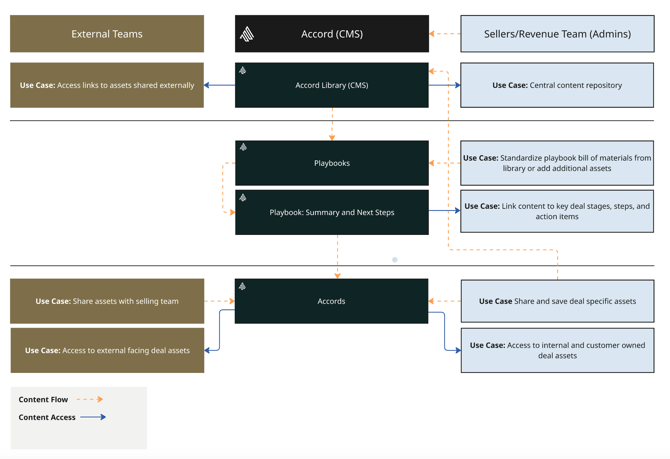
Content in Accord is organized and accessed across three distinct levels, each serving a different purpose in the revenue workflow: the Resource Library (CMS), Playbooks, and Individual Accords.
The Resource Library acts as the central content repository where your team stores and manages all approved assets including decks, one-pagers, case studies, videos, and more. Content here is curated by admins (typically sales enablement and product marketing teams), providing a single source of truth for your go-to-market materials.
Learn more about populating your resource library
Playbooks act as deal templates. When building a Playbook, your team can pull assets directly from the Resource Library and attach them to specific deal stages, summary pages, steps, or action items. This ensures that every deal kicked off from a Playbook starts with the best resources already in place.
Accords are the deal-level workspaces where everything comes together. Each Accord inherits assets from its parent Playbook and can be further customized with deal-specific content. Both internal team members and external stakeholders (customers and prospects) can interact with content directly within an Accord.
The diagram below illustrates how assets flow through these three levels and how content can optionally be synced back to the Library for future reuse.
Accessing Content From the Resource Library (CMS)
Internal Use Case(s):
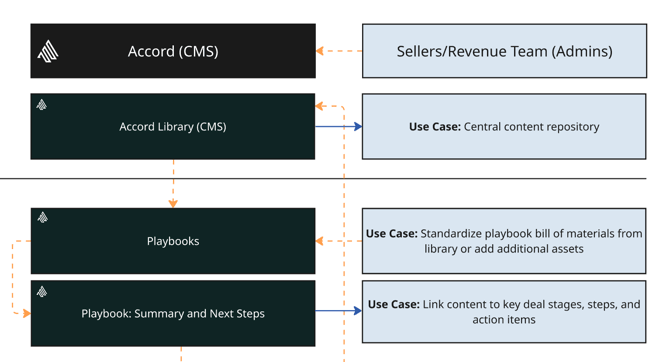
Use Case: Accord As a Central Content Repository
Internal teams can access content directly from your Resource Library to find the latest approved assets including brand materials, enablement resources, pitch decks, and more. Because the Library is the source of truth, your team never needs to hunt through email chains or shared drives to find current materials.
External Facing Use Case(s):
Use Case: Share Links to Assets Externally
Customers, prospects, or any external stakeholder can access content from the Accord Resource Library (CMS) via a timed expiry link. Sellers can share designated Library assets externally without needing to create a full Accord, giving prospects quick access to relevant materials while keeping the content centrally managed.

Leveraging Content in Playbooks
Note: Content added to a playbook from the library will stay synched to the library. Content added directly to playbook will not.
Internal Use Case(s):
Use Case: Create A Standardized Deal Bill of Materials
Revenue teams can include a standardized set of materials from the Accord Library directly within a Playbook. Assets in the Playbook can stay in sync with any changes made to the source files in the Library, so reps always present the current versions of collateral, proposals, or enablement content without any manual maintenance.
If required, assets can also be added directly to a playbook without using the Accord Resource Library.
Use Case: Link Assets to Key Deal Stages, Steps, and Action Items
In addition to the resource tab, sellers can embed assets directly onto Playbook Summary Pages and Next Steps. This ties key resources to specific action items, ensuring that reps and their customers can always find the right content in the right context, rather than hunting through a list of files. Linking content to deal stages and steps drives more consistent, guided deal execution across the team.
Note: At the playbook level external users do not interact with the Resource Library (CMS)
Content at the Accord (Deal) Level
Internal Use Case(s):
Use Case: Leverage Playbook Assets
When an Accord is created from a Playbook, it automatically inherits all assets attached to that Playbook, giving reps an instant, pre-loaded set of resources to work from without any manual setup. This ensures every deal starts with the right content in place, standardized across the team.
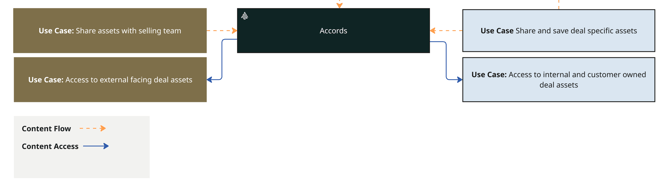
Use Case: Store and Share Deal-Specific Assets
Revenue and supporting teams can add additional content into an Accord either pulled from the Library or sourced externally (e.g. custom quotes, legal documents, statements of work, or pricing sheets). This makes the Accord a complete, deal-specific content hub. Documents added directly to an Accord can optionally be synced back to the Library for future reuse. See “Syncing Content Back to the Library” for additional information.
Use Case: Access to Customer Deal Assets
Revenue team members who are part of an Accord gain direct access to any assets added by the customer or prospect. This gives sellers full visibility into what the customer has contributed (e.g., security questionnaires, internal approvals, or other deal documents), keeping both sides aligned within a single shared workspace.
Note: If desired, sellers can disconnect assets attached to individual Accords from the Resource library causing the sync to stop.
External Facing Use Case(s):
Use Case: Share Assets With the Selling Team
Active customers or prospects who have been invited to an Accord can add their own assets into the Accord’s resources tab and assign them to mutual action plan steps. This enables true two-way collaboration on deal content.
Note: documents added by external users are not synced back to the Accord Library.
Use Case: Access to External-Facing Deal Assets
Active customers or prospects who have been invited to an Accord gain direct access to assets in the resources tab that are marked as “external.” These can be assets inherited from the Playbook or additional assets added to the Individual Accord by the seller. This gives buyers a clean, centralized view of all relevant materials.
Syncing Content Back to the Library
Content in Accord flows primarily downward from the Library to Playbooks to Individual Accords. However, there is also a mechanism for content to flow back up to the Library, depending on who added the content and how it was added.
Learn more about syncing content
Making Changes to the Resource Library
Assets that originate in the Accord Library and are attached to a Playbook or Individual Accord can be synced to the Resource Library. Any time an admin updates the source file in the Library, those changes automatically propagate to every Playbook and Accord where that asset is attached. No manual action is required by the seller.
Adding Content at the Accord Level
When a new document is added directly to an Individual Accord (rather than pulling it from the Library), that document does not automatically sync back to the Library. However, the seller has the option to add and sync it back to the Library at the time of upload. This is useful when a deal-specific asset such as a custom pricing template, a new case study, or an approved legal document is valuable enough to be made available for future deals across the team.
What Does Not Sync Back
Documents added to an Accord by customers or prospects are never synced back to the Accord Library. These remain scoped to the individual Accord in which they were uploaded, maintaining the appropriate separation between customer-contributed content and your organization’s internal content repository.